
ShopThing Marketplace:
Creating Your First Sales Event
We’re excited for you to sell on ShopThing, below is a guide on how to create your first event in 4 easy steps and start earning cash! You can also click here to attend our virtual Seller Masterclass! *If you are an international seller outside of Canada and the US, email us at hello@shopthing.com for additional resources!
Step 1: Creating an Event
Step 2: Filming Items
Step 3: Communicating with Customers
Step 4: Confirming Orders
1. Creating an Event
A) When you first download the ShopThing App you will be in customer mode, follow the steps below to access Seller Mode. Seller Mode enables you to become the host and create sales, which we call Events!
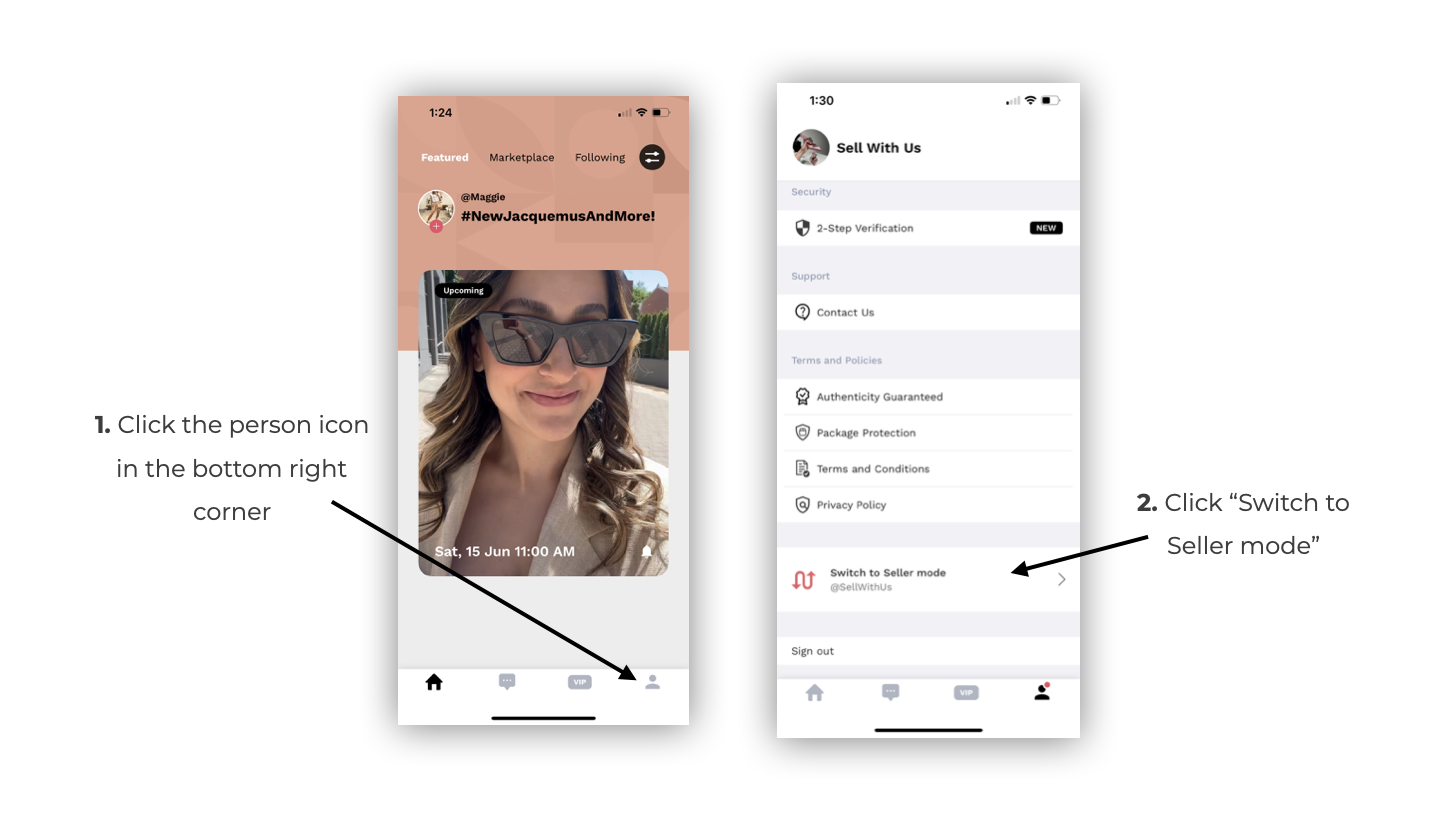
B) Please fill out all fields below to set up your event.
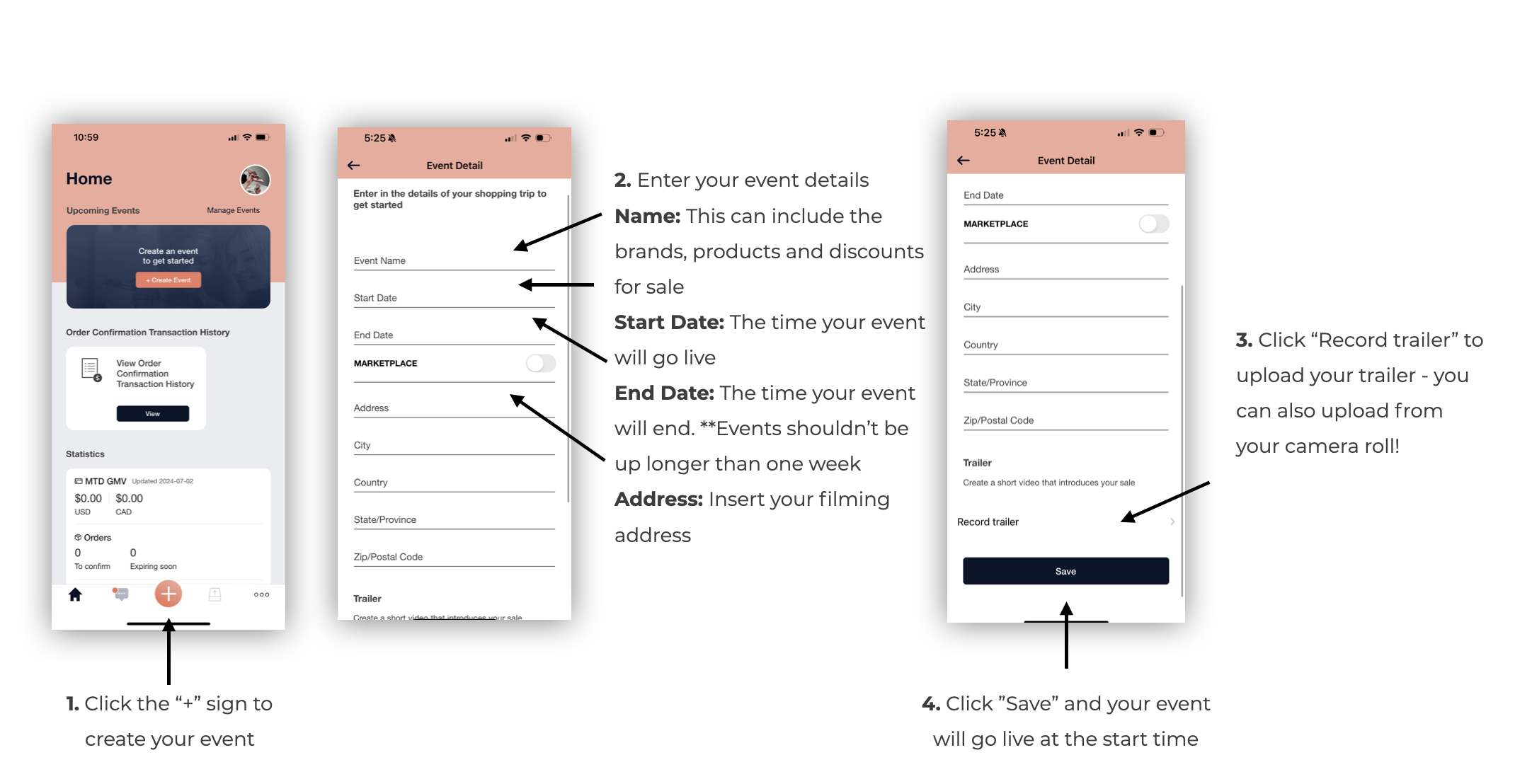
SALES TAX: ShopThing will automatically calculate, collect, and submit sales tax on your behalf as applicable, on a regular basis.
C) Event Trailer: Trailers are 20-60s videos that are required to introduce your sale on the App Homepage! This is your opportunity to promote your sale before it is live! Your trailer can be filmed on your phone camera and uploaded to the ShopThing App.
Tips on talking points to include:
Introduction to who you are and your style
Brands that you will be featuring in this event
Categories that you will be featuring in this event
Discount percentages (Ex. “I’ll be posting designer handbags for up to 80% off!)
2. Filming your Items
Uploading Products: To begin uploading products to your event, please watch the tutorial video below!
On the Shopper Homepage, enter your event by clicking “Enter Event”
Click the “+” button to add a product. You can film in the App, or upload a video from your phone
Add in the brand, product description, category, pricing, sizes and quantities
Add the “Final Sale” tag to every item. As well, add the “Pre-Loved” tag to every closet sale and/or “Pre-Loved” item.
Click continue and add a price sticker. This will only appear if your video is shared externally
Press “add media” to add supplementary videos/photos. Please add a minimum of two additional videos/photos per item
Press “publish” for the product to go live. You can publish before the event begins and the products will automatically go live at the start time!
FILMING REQUIREMENTS
Please follow the outlined filming requirements to ensure your sales can be successfully fulfilled to the customer. ShopThing may return the item to you for a refund if it does not adhere to the following requirements:
Pre-Loved: All Closet Sale items are considered “Pre-Loved”. When posting items from your own closet, please use the “Pre-Loved” Tag on every item. This includes items that have never been worn and items with original tags.
It is important to clearly highlight any item imperfections in your video, audio, and product descriptions. Imperfections to highlight include, but are not limited to:
Discolouration
Leather wear
Tarnishing
Corner wear + scratches
Missing gems
Small holes/ stains
Condition of hardware
Odour
Authenticity: In order to sell on our Marketplace, we require that all products posted are purchased from a reliable source and are authentic. If you sell a bag that is equal to or greater than $500 in your local currency, you will be required to send it to ShopThing for authentication. Please follow our Authentication shipment process linked here.
Product Inclusions: Always mention what the items comes with, such as a dust bag or box, and the condition of those inclusions.
PRICING: For items sold on the ShopThing App, a Transaction Fee (in an amount equal to 10% of the sales price), a Payment Processing Fee (in an amount equal to 3.5% of the final order price), as well as the taxes charged on these Fees, will be deducted from your Payouts.
Sellers utilizing ShopThing’s carrier accounts to generate a shipping label will also be charged a Seller Protection fee (A base fee of $2.00, plus tax, will be charged for orders with a sales price up to $1,000. For every $1,000 increment over $1,000, an additional $2.00, plus tax, will be charged). The Protection Fees will be charged in the Seller's local currency. Learn more about our Seller Protection program here.
*Your Payout will not include sales tax. ShopThing will automatically calculate, collect, and submit sales tax on your behalf, as applicable, on a regular basis.
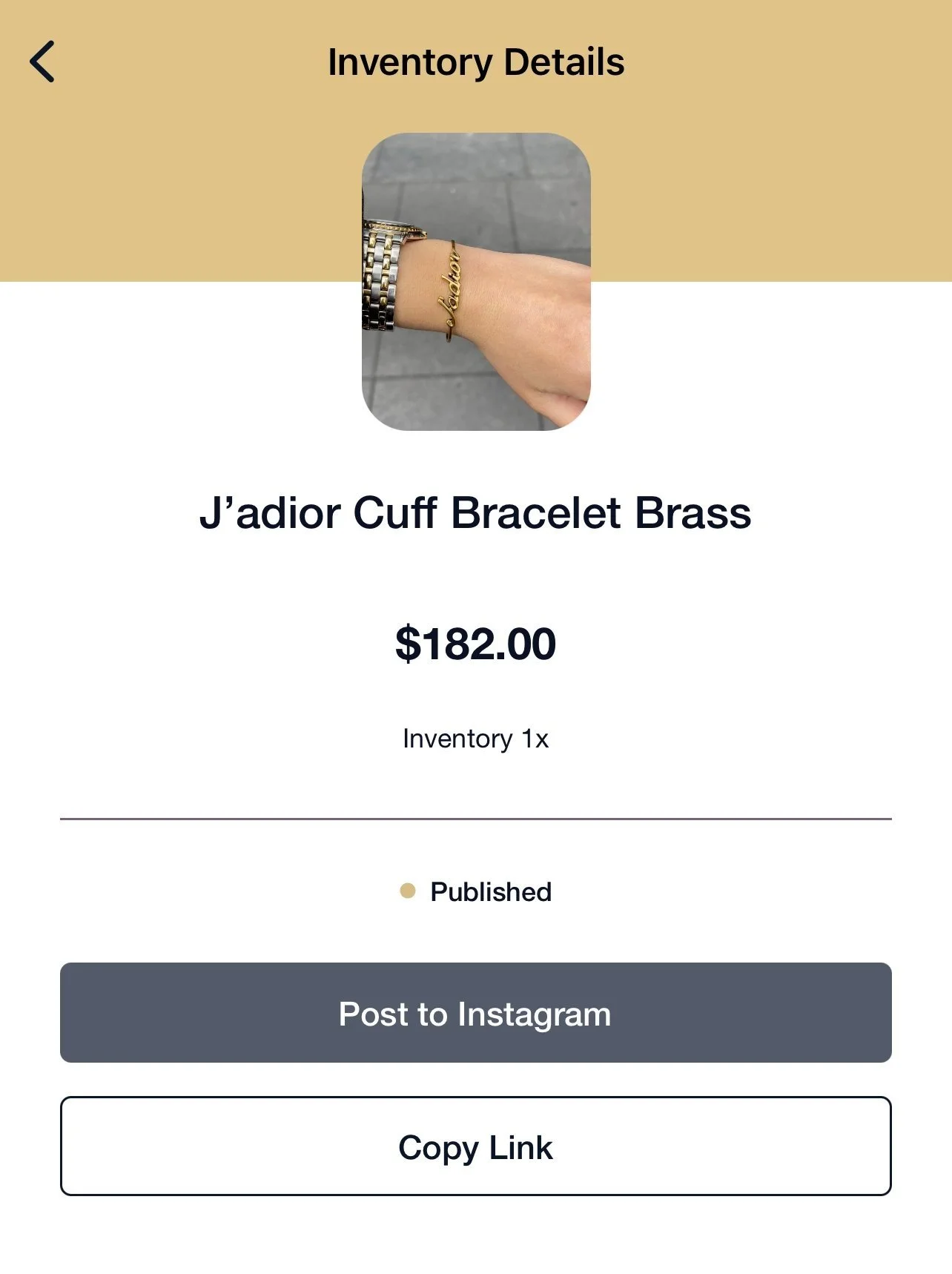
SHARING TO INSTAGRAM: You can share your product with a shoppable link to Instagram, at the click of a button!
Tap into your product
Click “Copy Link”
Click “Post to Instagram”.
Post your product with the shoppable link!
3. Communicating with Customers
FAQS
What is the return policy? All Marketplace items are final sale, even for VIP members! That being said, should you have any questions regarding this policy, you may still reach out to our team to help resolve any questions or concerns.
Can you ship to US/Canada? Yes, all items can be shipped to the US and Canada!
Can I bundle items? Items cannot be bundled and must be ordered on a 1 item per cart basis.
Once your event goes live you will begin to receive in-App messages from your very own potential customers!
It's important to respond to these messages accurately and in a timely manner. Please ensure that all messages are responded to within 24 hours!
If you come across a question that you don’t know how to answer, please send us an email and we will provide further support!
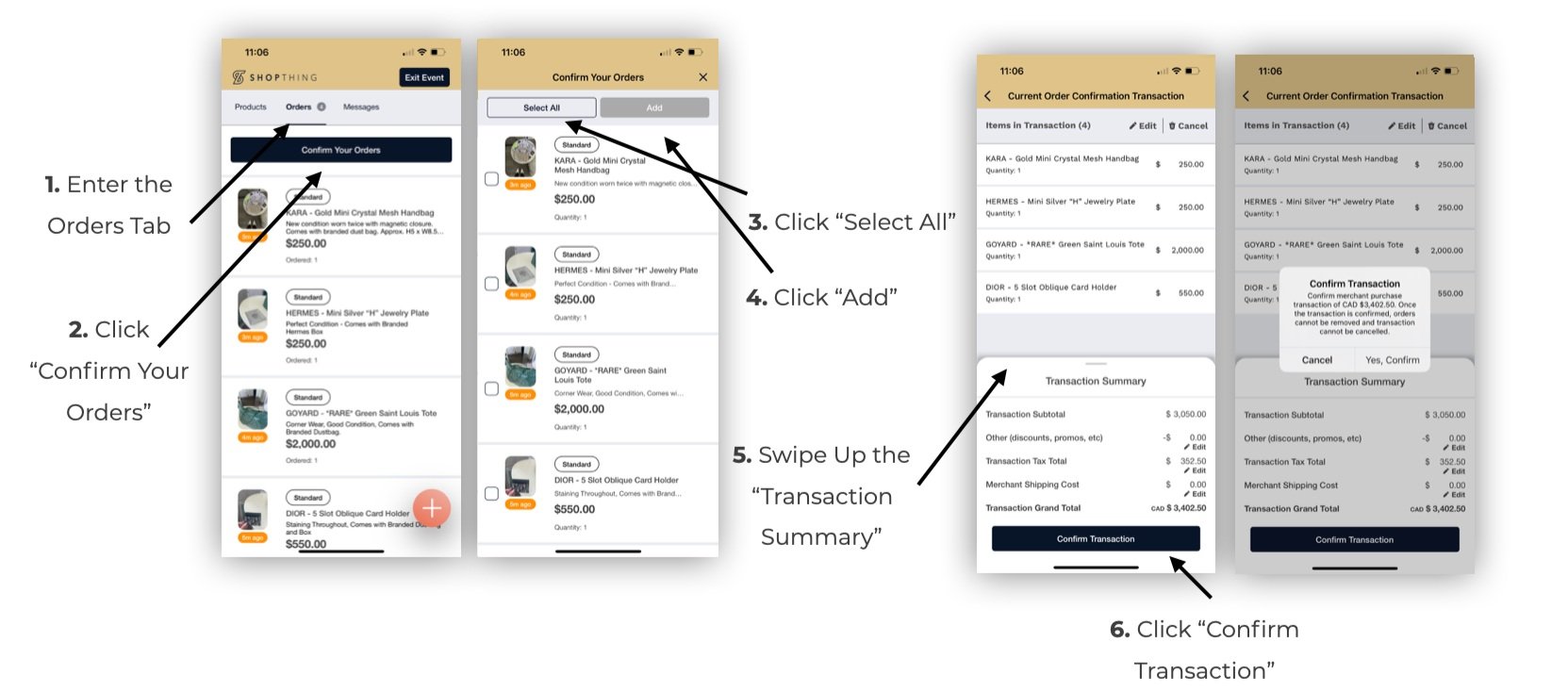
4. Confirming your Orders
It is best practice to confirm your sold items from closet sales when they sell and ship them promptly. If you are shopping from a local retailer, you must confirm your sold items within 2 days of your sale ending,
IMPORTANT: Orders will automatically be cancelled and refunded to the customer after 7 days of being placed if they are not confirmed on the ShopThing App.
Ready to ship your orders click here!
Have a question? Send us an email and we’ll get back to you soon!